
Simple Medication Reminders for Older Adults
PillPal Health helps you keep track of medications, vitamins, and supplements with clear reminders and one easy-to-read daily schedule. See what’s due, what you’ve taken, and what’s coming up next.
What is PillPal Health?
Life gets busy.Whether you take one medication or several, PillPal helps you stay on track without unnecessary complexity.Designed with simplicity in mind, PillPal makes it easier to remember medications, track what you've taken today, and keep important medication information in one place.PillPal is designed with older adults in mind, using clear language, large touch-friendly controls and an uncluttered daily view. It makes it easier to see what is due, what you have taken and what is coming next; however, PillPal is useful for anyone who wants a clearer way to manage medications, vitamins and supplements.
Your Day at a Glance
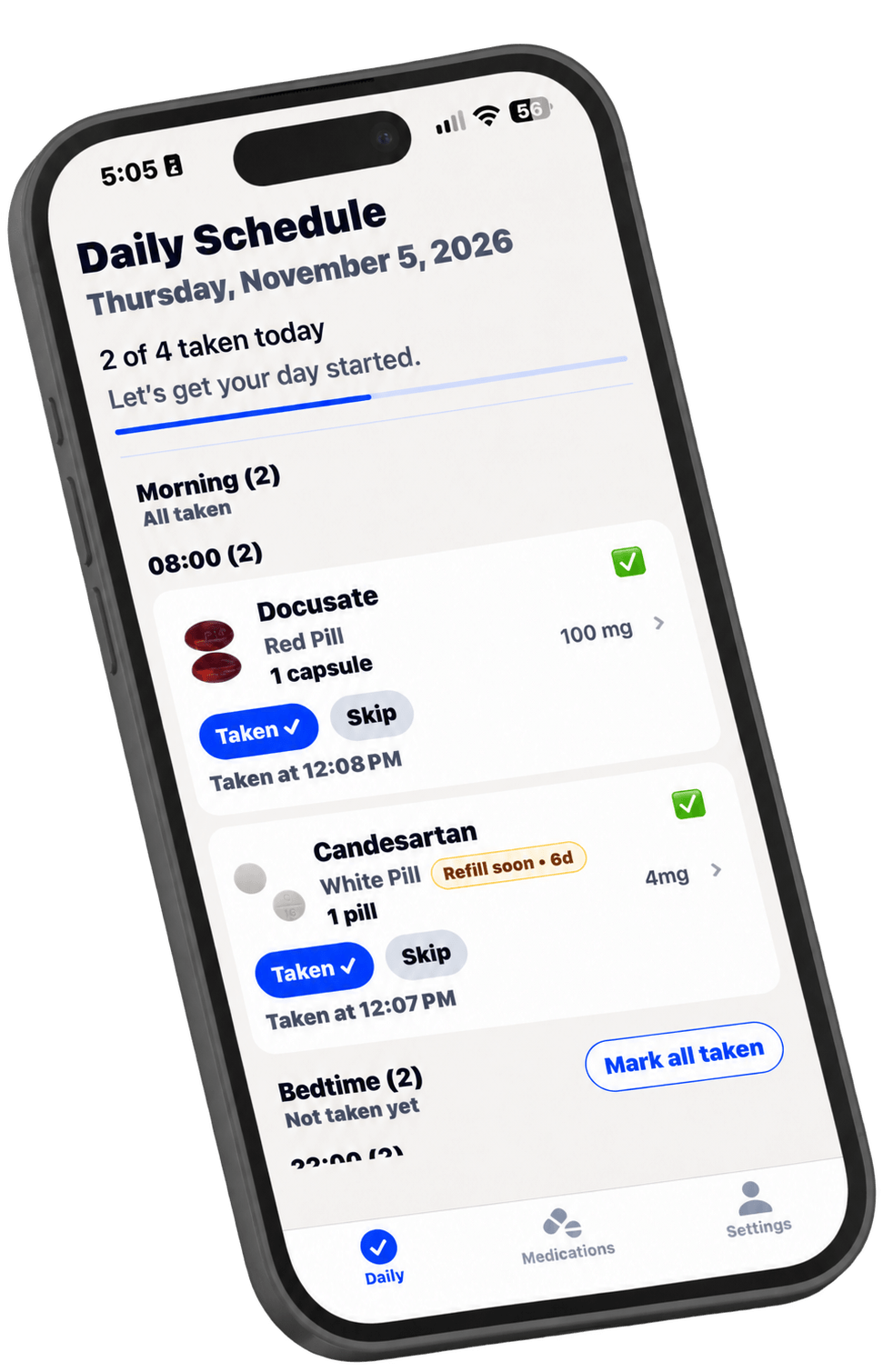
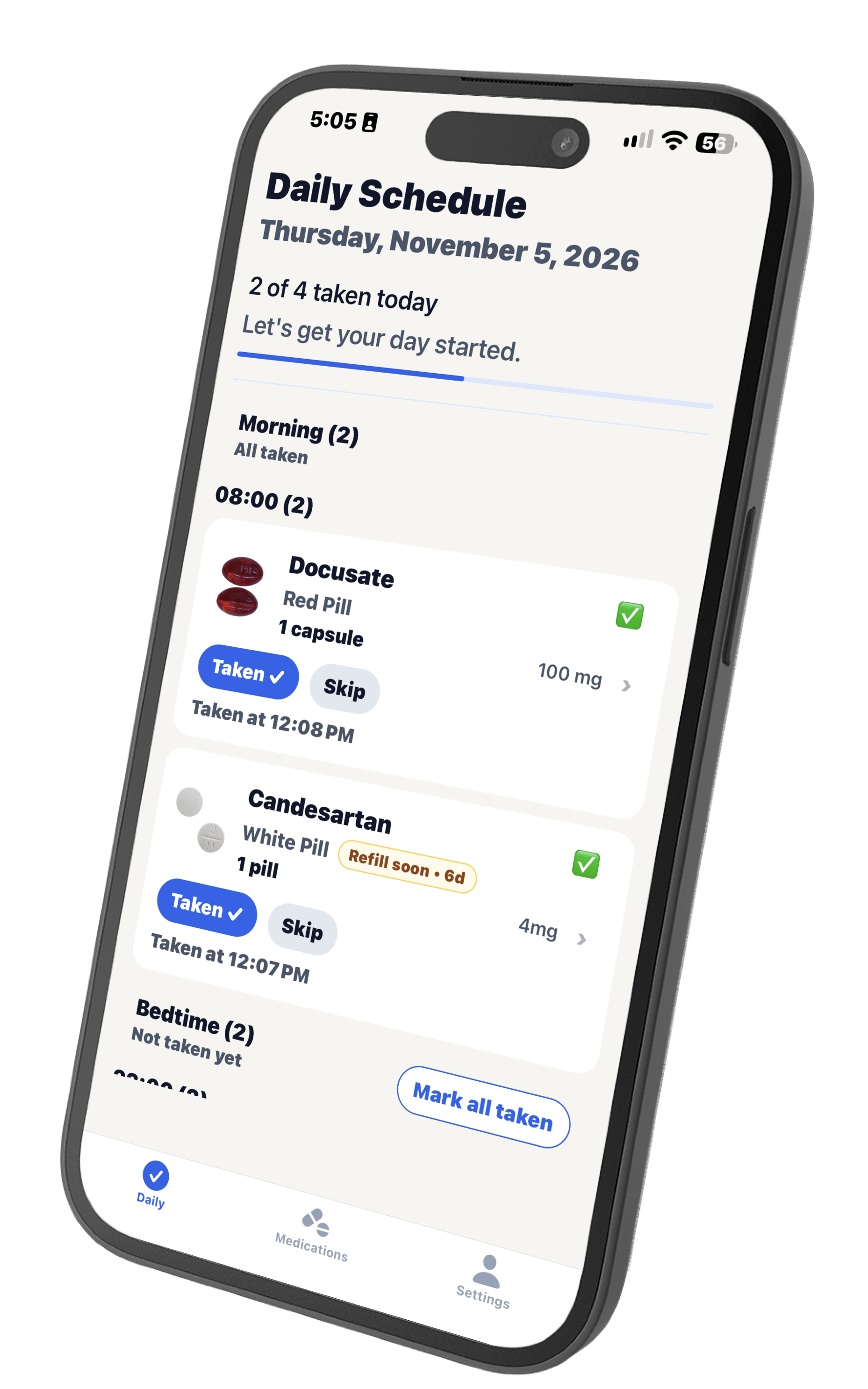
PillPal's Daily Schedule gives you a clear picture of your day. See what you've taken, what's still due, and what's coming up next—all on one easy-to-read screen.
Everything In One Place
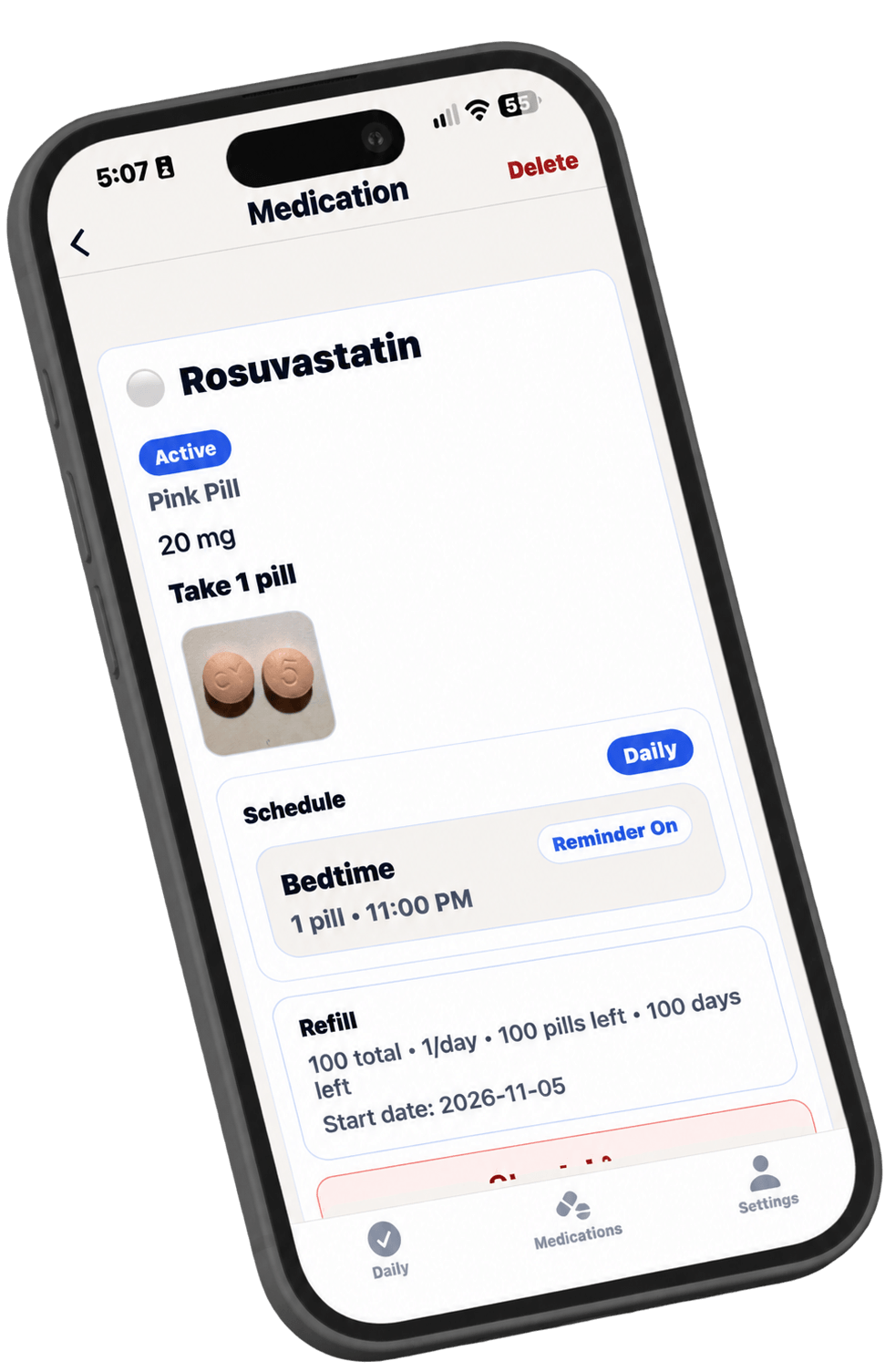
Keep all your medication information organized and easy to find. From strengths and instructions to refill information and personal notes, everything is together in one place.
Helpful Reminders
Stay on track with clear medication reminders that are easy to understand and simple to act on throughout your day.
Your Medications. Your Privacy.
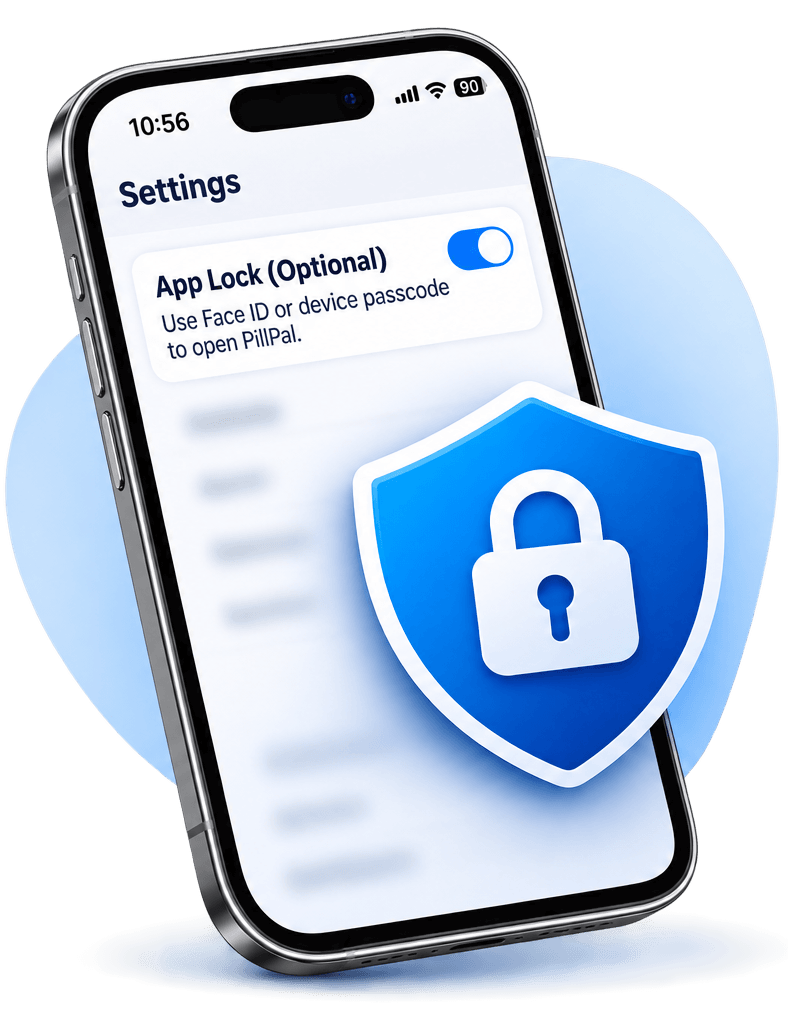
Your medication information stays on your device, not on our servers. No account required. For added privacy, protect access to PillPal with Face ID or your device passcode.
Why Choose PillPal Health?
Everything you need to stay on track.
Simple
Clear reminders and an uncluttered design that's easy to use.
Organized
Keep medications, vitamins, supplements, instructions, and notes together in one place.
Reliable
Stay on track every day with your Daily Schedule and medication reminders.
Built for Real Life
Whether you take one medication or several, PillPal fits naturally into your everyday routine.
About
Hi, I’m Sid. I’m a 65-year-old Canadian founder building PillPal because medication software should be simple, clear and respectful of the people using it.PillPal is being developed with older adults in mind and improved through feedback from real users. My goal is to create a medication reminder app that helps people manage their daily routines with greater confidence and independence—without unnecessary complexity.
Frequently Asked Questions
What is PillPal Health?PillPal Health is a simple medication reminder app designed with older adults in mind. It helps you organize medications, keep track of daily doses, and receive clear reminders when it's time to take your medication.Is PillPal easy to use for seniors?Yes. PillPal is designed to be simple and easy to navigate, with large, readable text, clear buttons, and an uncluttered layout. You don't need to be comfortable with technology to get started.How does PillPal remind me to take my medication?PillPal sends notifications to your phone when it's time to take your medication. You can set reminder times for your medications and keep track of doses you've taken or skipped.Can I manage multiple medications with PillPal?Yes. PillPal lets you organize multiple medications, including prescriptions, vitamins, and supplements. You can view your daily medication schedule and track what you've taken in one place.Is my medication information private?Yes. PillPal stores your medication information on your device rather than on our servers. No account is required, and you can enable an optional app lock using Face ID or your device passcode.
Get Notified When PillPal Health Launches
Getting Started | Privacy Policy | Support
© 2026 PillPal Health. All rights reserved.
Privacy Policy
Effective date: November 6, 2026OverviewThis policy explains how Sid Soil, the operator of PillPal Health (referred to as “PillPal” or “the App” , "we," "us," or "our" in this policy), handles information when you use the PillPal iOS app, contact us, or sign up for launch notifications at pillpalhealth.com. PillPal helps you organize medications, schedules, reminders, refill information and dose history.
Medication records are stored on your device. Website sign-up details and information you send to support are received separately by us and the services used to process them. PillPal does not require an app account or synchronize medication records with a PillPal server.Privacy at a Glance
PillPal is designed to help you manage medication information while keeping your medication records on your device.
• Information we use: PillPal stores medication details, schedules, dose history, photographs and optional personal information on your device.
• Why we use it: This information allows PillPal to provide medication reminders, track medication use, manage refills and generate reports.
• Information sharing: PillPal does not automatically transmit your medication records to us or to an external analytics or image-recognition service. You choose whether to share medication reports. Some files may be included in device backups, as explained below. Website submissions, support communications and Apple diagnostics are handled separately.
• Privacy considerations: Medication information is sensitive. Information may be visible to someone who has access to your device, appears in notification previews or is included in reports you choose to share.
• Your choices: You can control permissions, edit or delete medication information, disable notifications and choose whether to share reports.Information Stored on Your Device
• Medication details, including name, nickname, strength, format, instructions, notes, schedules, doses, start and stop dates, and active status.
• Refill information, including quantities, remaining units and refill thresholds.
• Dose history, including scheduled times, taken or skipped status, and the time a status was recorded.
• Optional name, date of birth and gender for inclusion on medication reports.
• Medication photographs, temporary camera and label-scanning images, and generated medication reports.
• Preferences for text size, display theme, reminders, startup screen and optional app lock, plus local record and notification identifiers.
• You choose what information to enter. Name, date of birth and gender are optional; any provided details are included in your medication report.How PillPal Uses Information
PillPal uses information on your device to display medications and dose history, schedule reminders, calculate refill status, suggest medication details from scanned labels, generate reports you request, and apply your chosen settings. Local identifiers connect medication records, dose entries and reminders within the app.Camera Photos and Label Scanning
PillPal uses the camera or photo picker when you choose to take or select a photograph. Label scanning uses Apple’s on-device image-recognition technology to suggest medication details for you to review and edit. PillPal does not send label images or extracted text to an external image-recognition service.
A photograph attached to a medication is saved in the app’s storage. PillPal attempts to remove app-created temporary camera and scanning files after processing or cancellation and cleans up its managed sensitive temporary folder when the app starts. Interrupted processing or cleanup failures can delay removal. Original photographs in your photo library are managed separately.Permissions and Device Features
Feature Purpose Your control
Camera Take medication photos and scan labels. You can deny or revoke camera permission.
Photos Select a medication photograph. You choose which photograph to select.
Notifications Deliver local medication reminders. You can change permission, alerts and previews in iOS settings.
App Lock Authenticate you using supported device authentication, such as Face ID, Touch ID or your device passcode. If you enable App Lock, PillPal asks your device to authenticate you using Face ID or your device passcode. PillPal does not receive or store your facial image, passcode or biometric information.Notifications
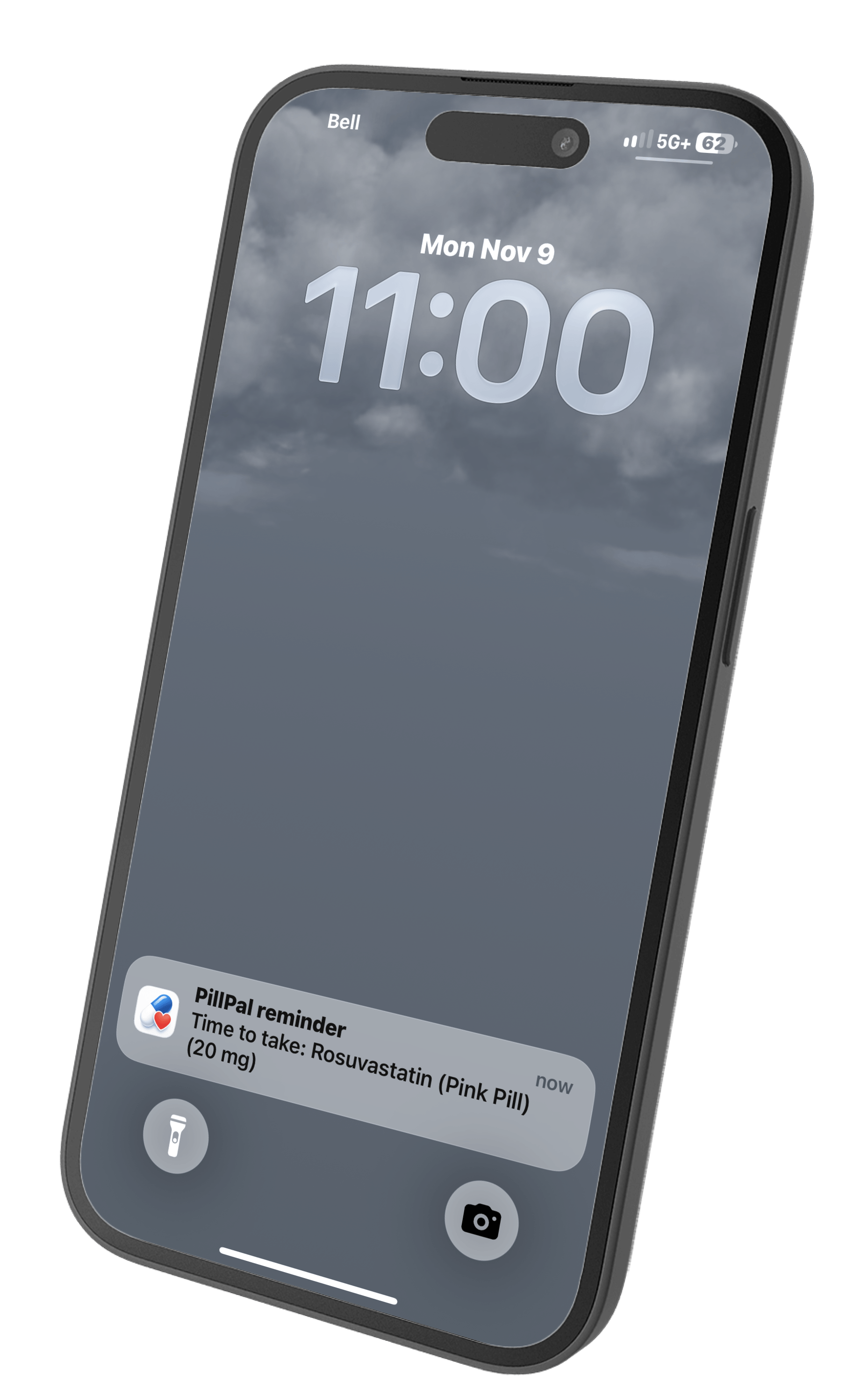
Medication reminders are scheduled locally on your device. PillPal does not use a PillPal server or a third-party push-notification service to deliver reminder content. Notifications can contain medication names or nicknames, strengths, instructions, and refill information. This information may appear on your lock screen, in notification history or on a connected device, depending on your settings.Reports and Information You Choose to Share
PillPal can create a PDF medication report containing medication details, photographs, schedules, instructions and dose status, together with any optional name, date of birth and gender you have saved. You choose the recipient or service through the device’s sharing options. PillPal does not send the report to us automatically.
PillPal attempts to remove its temporary PDF files after the sharing process finishes. Recipients and services you select manage their own copies under their privacy practices. Removing data in PillPal does not remove exported, printed or shared copies.Website Launch Signups
If you submit the launch-notification form on pillpalhealth.com, we receive the name, email address and any message you provide. We use this information to manage your request and send the requested PillPal launch notification. Website signup information is separate from medication records stored in the app. Please do not include medication details or other sensitive health information in this form.
Our website is hosted by Carrd, and form submissions are delivered to our email inbox. Carrd and the email services involved process submission information to provide this service.
You may cancel your request or ask us to delete your details by contacting [email protected].
We delete launch-signup emails and any separate copies of signup details within 30 days of receipt, or sooner upon request. If PillPal has not launched within that period, your details will be deleted, and we will be unable to send you the launch notification. The launch-notification form will be removed when the app launches.
Submission emails are accessible only to the operator. The email account is protected by a strong, unique password and two-factor authentication, and devices used to access it are protected by a passcode or password.
Support communications are handled separately as described below.International Processing of Website and Support Information
We use service providers for website hosting, forms, analytics and email. Information processed through these services may be stored or processed outside Canada, including in the United States.
Information processed in another country is subject to that country’s laws, which may permit access by courts, law enforcement or other government authorities in certain circumstances. Those laws may differ from the laws where you live.
This processing is separate from medication records stored locally within PillPal. PillPal does not automatically send those records to our website, analytics or email providers.Support Communications
If you contact us by email, we receive your email address and the message, attachments and other information you send. Your email provider and ours also process information to deliver and store correspondence. Please avoid sending medication or other sensitive information unless necessary for your request.
We use support correspondence to respond, troubleshoot and maintain necessary records. We generally delete it within 12 months after our last interaction. Where operationally possible, we delete messages or attachments containing medication or other sensitive information within 30 days after the request is resolved. We may keep information longer to meet legal obligations, address disputes or security concerns, or complete an active request. You can contact us to request deletion.Analytics, Diagnostics, Advertising and Tracking
The app does not include a dedicated advertising network, behavioural analytics service or third-party crash-reporting service. PillPal does not use medication information for advertising or track app users across other apps or websites.Website Analytics
With your consent, we use Google Analytics on pillpalhealth.com to understand visits and how people use the website. Google Analytics is enabled only after you accept analytics cookies. It may process cookie identifiers, pages viewed, interactions, browser and device details, referral sources and approximate location to provide analytics reports.
You can manage cookies through your browser settings. Google also provides information about its processing at https://policies.google.com/technologies/partner-sites and a browser opt-out add-on at https://tools.google.com/dlpage/gaoptout. Website hosting and form services may also process technical information needed to operate the site and sign-up form.Apple Diagnostics
If you choose to share diagnostic information with app developers through Apple’s device settings, Apple may provide us with crash reports and diagnostic information about PillPal. We use this information to investigate problems and improve app reliability.Cookie Preferences — CookieYes
We use CookieYes to display our cookie banner and manage your cookie choices. CookieYes uses a cookie to remember your preferences and may process consent records, including a masked IP address, to document those choices.
Google Analytics operates only when you accept analytics cookies. You can reject analytics cookies or withdraw your consent at any time using the cookie preferences button at the bottom-left of our website. Withdrawing consent stops future Analytics collection; it does not erase information already collected.
CookieYes maintains records of cookie-consent choices. Consent logs are available for export for up to one year, while the dashboard provides access to the most recent month. Our consent-expiration setting is 365 days. You can change your choices sooner using the cookie preferences button on our website.
For more information, see the CookieYes Privacy Policy.When Information May Be Disclosed
PillPal does not sell or rent personal information. The app does not transmit medication records to us to create de-identified or aggregate datasets.
Information may be disclosed when you choose to share a report or send a message, to providers processing website signups or support on our behalf, or when necessary to meet legal obligations or as permitted or required by applicable law and reasonably necessary to protect rights or safety. Providers processing information on our behalf are expected to use it only for authorized purposes and protect it appropriately. We cannot disclose device-only medication records that we do not receive.Retention and Deletion
Medication records, profile details and preferences remain on your device until changed or deleted. When you delete a medication, PillPal retains information briefly to support Undo. After the Undo period expires, it finalizes deletion of the pending record, related dose history and unreferenced medication photo, and cancels associated reminders. Cleanup may be delayed if the app is interrupted or an operation fails. Replacing a photo also triggers cleanup of an unreferenced app-managed photo.
Use Settings → Delete All PillPal Data to remove medication records, dose history, profile details, settings, pending Undo data, app-managed photographs and cached files, including temporary reports. It also clears scheduled and delivered PillPal notifications. If an operation fails, the app reports that deletion was incomplete.
Deleting PillPal removes its locally stored app data. Offloading PillPal is different: it removes the app while retaining its documents and data for reinstallation. Copies previously exported, shared or included in device backups must be managed separately.Backups and Device Storage
PillPal’s core medication-record storage is configured to be excluded from device backups. Other locally stored files, such as medication photographs, may be included depending on the file type and your device and backup settings. Apple manages device backups under its own privacy practices and security settings.Security and App Lock
PillPal relies on iOS device protections and offers optional App Lock using supported Face ID, Touch ID or device-passcode authentication. PillPal receives an authentication result and stores the App Lock preference, but does not receive or store your facial image, biometric template or device passcode. Protect your device and review notification previews and report-sharing choices. No storage method is completely secure.
Personal information received through our website or support communications is protected using safeguards appropriate to its sensitivity.
These safeguards include restricting access to authorized individuals, using authentication controls and relying on service providers that maintain appropriate security protections.
We also limit how long we retain personal information, as described in this policy.Your Choices
You can leave optional report details blank, review scanned information, edit or delete medication records, change device permissions, turn reminders and App Lock on or off, choose whether to share reports, and use Delete All PillPal Data. Some features require the corresponding device permission. There is no PillPal online app account to delete.
You can manage camera and notification permissions in your iPhone’s Settings. Disabling a permission prevents features that depend on it from working.
You can contact us to request access, correction or deletion of signup and support information we hold, subject to applicable requirements. Please provide only the information needed to identify and respond to your request.Children and Caregiver Use
PillPal is intended for individuals managing their own medications and adults or caregivers managing medication information on behalf of another person.
PillPal is not designed for children under 13 to use independently.
Where an adult or caregiver enters medication information about another person, they should have the necessary authority or permission to do so.
Caregivers are responsible for managing access to the device and ensuring that medication reports are shared only with appropriate recipients.Changes to This Policy
We may update this Privacy Policy when our information practices change.
When we make changes, we will update the effective date and publish the revised policy on our website.
Where changes are significant, including introducing new purposes for using personal information or new disclosures to third parties, we will provide additional notice and obtain consent where required by applicable privacy law.
The current version of this policy will remain available through the PillPal website.Access Requests and Privacy Complaints
To request access to or correction of personal information we hold, or to raise a privacy concern, contact Sid Soil at [email protected]. We may request information reasonably necessary to verify your identity.
For access requests governed by PIPEDA, we respond within 30 days unless a legally permitted extension applies. If an extension is needed, we will notify you within the initial 30 days, explain the reason and revised deadline, and advise you of your right to complain. If access is refused, we will explain the reason and available recourse, subject to legal restrictions.
We will investigate privacy complaints and respond to you. You may also contact the Office of the Privacy Commissioner of Canada at www.priv.gc.ca or the applicable provincial privacy regulator.Contact and Privacy Accountability
Sid Soil is responsible for PillPal's privacy practices and for responding to privacy questions, access requests and complaints.
Operator and Privacy Contact: Sid Soil
Email: [email protected]
Website: pillpalhealth.com
PillPal Health Support
Need help with PillPal Health? Email us directly at: [email protected]Please describe the issue and include your device model and iOS version. Avoid including medication details or other sensitive personal information
Getting Started
Add Your First Medication
Adding a medication to PillPal is easy. You can enter the details yourself or take a photo of your prescription label.
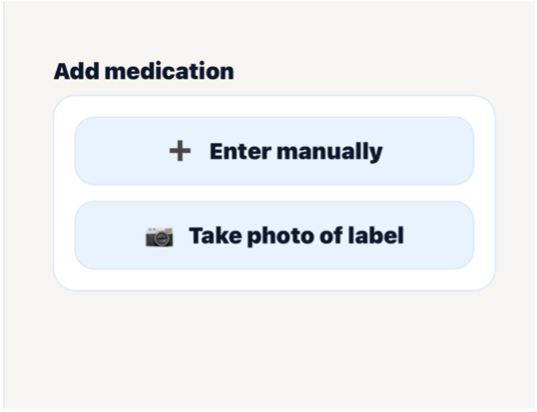
Step 1 - Adding a medication
Open the Medications tabChoose one of two options:• Enter Manually — Type in your medication details.
• Take a Photo — Take a picture of your prescription label. If you choose Take a Photo, allow camera access if prompted. Take a picture of your prescription label, confirm the photo, and review the information PillPal extracts.Tip: Always check that the medication information is correct before continuing.
Step 2 — Enter Your Medication Details
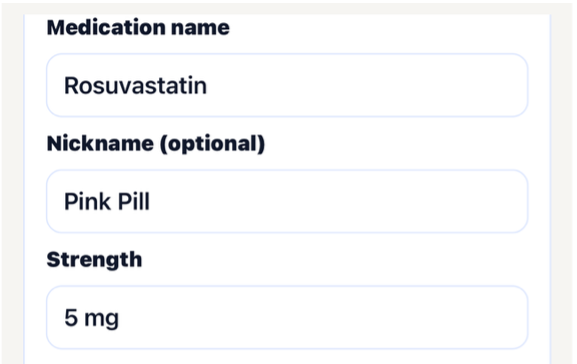
Complete the medication information, including:
• Medication name and strength.
• An optional nickname to help identify it.
• Any special instructions, such as "Take with food."
• Medication format and an optional photo.
• Always check that the medication information is correct.
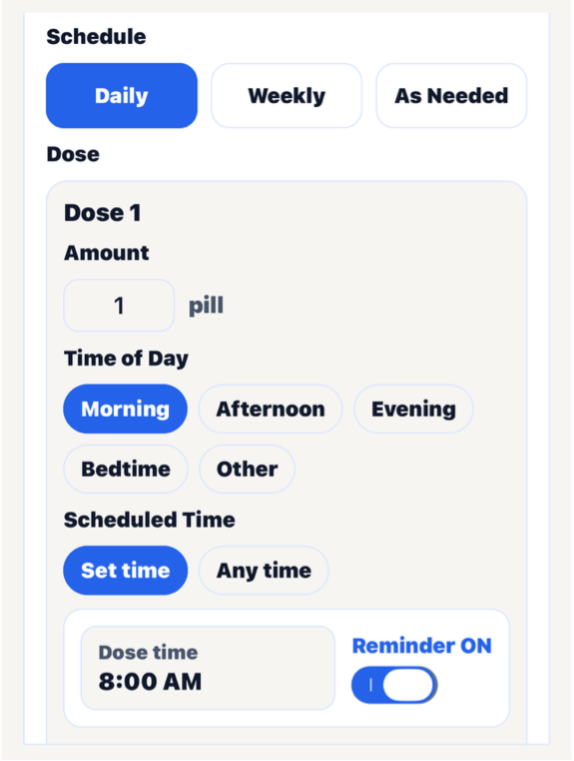
Step 3 - Set Your Schedule
Choose how often you take your medication:
• Daily - Every day.
• Weekly - Select the days of the week.
• As Needed - For medications you don't take on a regular schedule.Turn on Reminders and select a time if you'd like PillPal to notify you.
Step 4 — Save Your Medication
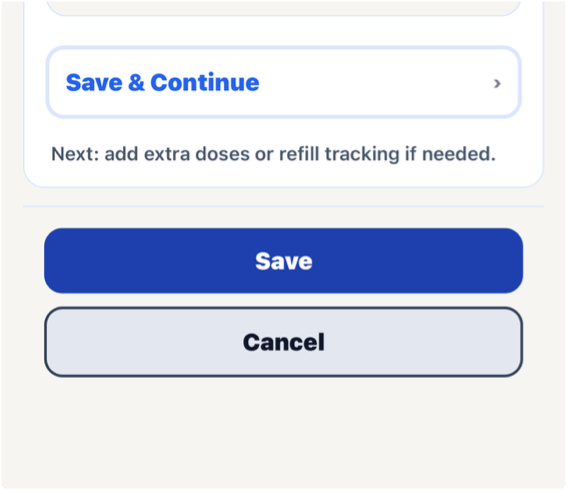
Tap simply save your basic medication information or Tap Save and Continue to access additional options, including more complex schedules and refill tracking.Review your medication details on the Medication Summary screen.